Are you terrified of breaking your site during a server move?
Migrating a WordPress or WooCommerce site to a new server can be stressful. If a customer buys a product while the servers are switching, that order might get lost forever!
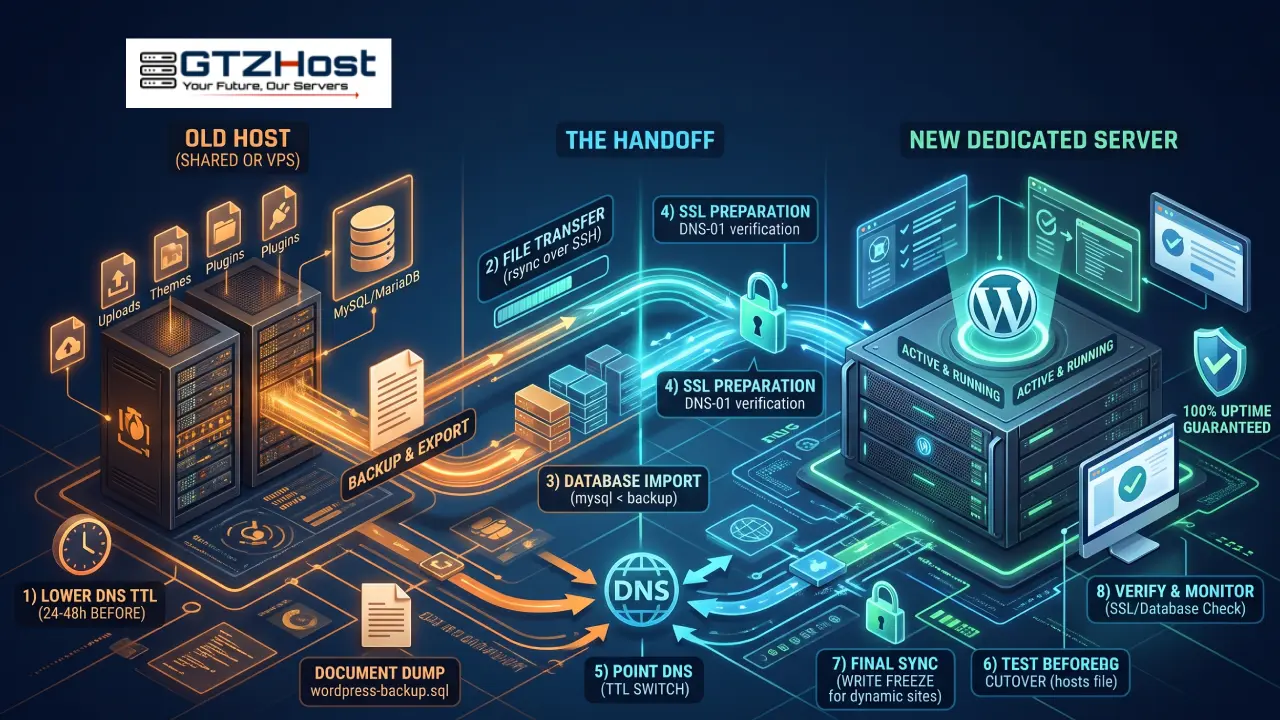
To do a zero-downtime migration like a pro, you must follow a strict sequence: ✅ Lower your DNS TTL 48 hours in advance.
✅ Transfer files using secure SSH protocols instead of basic plugins.
✅ Use the "hosts file trick" to test the new website on your personal computer before the public sees it.
✅ Freeze your database during the final sync so no orders are lost.
If you are upgrading your site's speed by moving to bare-metal dedicated servers, doing the migration correctly is the most important step.
About the author
- High-performance AMD EPYC & Intel Xeon dedicated servers starting at $43/mo. Deploy across 250+ locations, including USA hubs like Missouri and Montana, to global nodes in Palermo. Your trusted global hosting provider.
Comments
Join the discussionFreezing the database during the final sync is the step that gets skipped most, and on a WooCommerce store it's exactly where an order goes missing. Lowering the TTL 48 hours ahead also matters more than people think, since some resolvers hold the old record until the original TTL runs out. Testing through the hosts file before the switch catches broken absolute URLs early too.